C++ Engineering Notes
This note is adapted from course materials for CS2311 Computer Programming at City University of Hong Kong. Instructor: Shuaicheng Li.
Central Question
How does C++ provide high-level abstraction while retaining explicit control over object lifetime, memory, hardware resources, and performance?
C++ exists because some programs need both sides of an uncomfortable tradeoff. We want abstractions such as strings, vectors, classes, generic algorithms, and thread objects. But we also want predictable lifetime, memory layout, cache locality, deterministic cleanup, and direct access to operating-system or hardware resources. C++ does not hide those costs; it gives the programmer tools to make them explicit.
The causal spine is:
\[\text{source code} \rightarrow \text{types and expressions} \rightarrow \text{compilation and linking} \rightarrow \text{storage duration} \rightarrow \text{object lifetime} \rightarrow \text{ownership} \rightarrow \text{abstraction} \rightarrow \text{resource management} \rightarrow \text{concurrency} \rightarrow \text{measured performance}.\]The running example is a small sensor-processing subsystem. A program acquires readings from a sensor, stores samples, processes them, and possibly shares results across threads. The hard questions are not only “what syntax works?” but:
- who owns the sensor handle?
- when is the file, device, or mutex released?
- which objects live on the stack, heap, or static storage?
- when is copying expensive?
- when does abstraction disappear at compile time, and when does it add runtime dispatch?
- how do we know the bottleneck is CPU, memory, I/O, or synchronization?
1. Translation: From Source Text to Executable
C++ source is not interpreted line by line. A program is split into translation units, usually .cpp files after preprocessing. Each translation unit is compiled to an object file, then the linker combines object files and libraries into an executable.
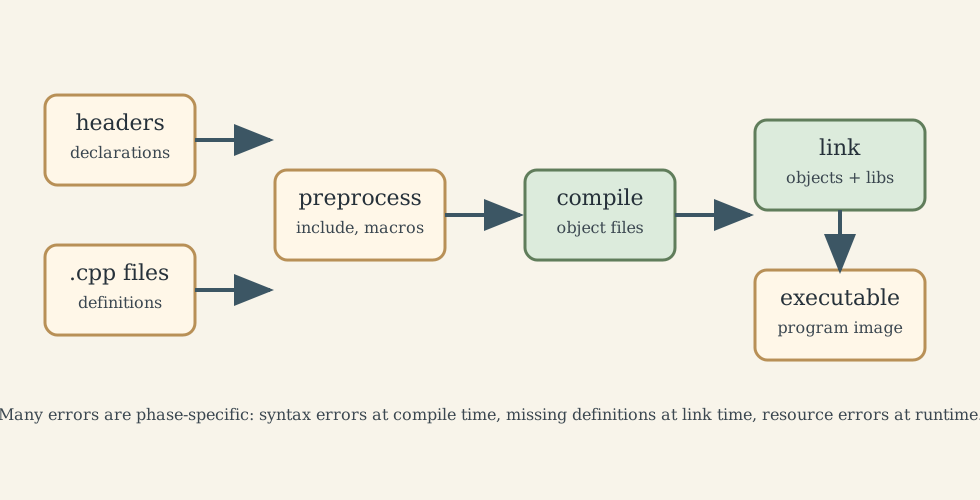
This model explains many beginner errors:
#includecopies declarations into a translation unit before compilation;- a declaration tells the compiler that a name exists;
- a definition provides storage or executable code;
- “undefined reference” is usually a linker error: the compiler accepted the declaration, but the linker did not find a matching definition;
- “multiple definition” often means the same non-inline definition was placed in more than one translation unit.
// hello.cpp
#include <iostream>

int main() {
    std::cout << "Hello, World!\n";
    return 0;
}
The main function is the program entry point. Returning 0 conventionally means success.
2. Types: The Compiler as an Early Error Detector
C++ is statically typed. Every expression has a type known at compile time, and the compiler uses those types to reject invalid operations before the program runs.
2.1 Fundamental and Fixed-Width Types
Built-in types include bool, character types, signed and unsigned integers, floating-point types, and void. Their exact sizes are partly implementation-dependent. That is why portable code uses <cstdint> when width matters:
#include <cstdint>

std::int32_t encoder_count = 0;     // exactly 32 bits if provided
std::uint64_t timestamp_ns = 0;     // unsigned 64-bit timestamp
std::size_t n_samples = 1024;       // size/index type
Use std::size_t for container sizes and indexing quantities that cannot be negative. Be careful when mixing signed and unsigned arithmetic: underflow in unsigned integers wraps by definition, which can hide bugs.
2.2 const, constexpr, and volatile
const expresses a promise not to modify through a particular name or access path:
void calibrate(const std::vector<double>& samples);
The function can read samples without copying it and cannot accidentally modify it.
constexpr means a value or function can participate in compile-time evaluation when its inputs are available:
constexpr double square(double x) { return x * x; }
constexpr double area = 3.14159 * square(0.25);
volatile is for special memory whose value may change outside ordinary program flow, such as memory-mapped hardware registers. It is not a thread-synchronization tool. Use std::atomic, mutexes, or other synchronization primitives for communication between threads.
2.3 Initialization and Narrowing
Brace initialization helps catch narrowing conversions:
int ok{42};
// int bad{3.14};  // error: narrowing conversion
int truncated = 3.14;  // allowed, but usually not what was intended
This is not just style. In sensor or simulation code, silent unit or precision loss can become a physical error.
3. Storage Duration and Object Lifetime
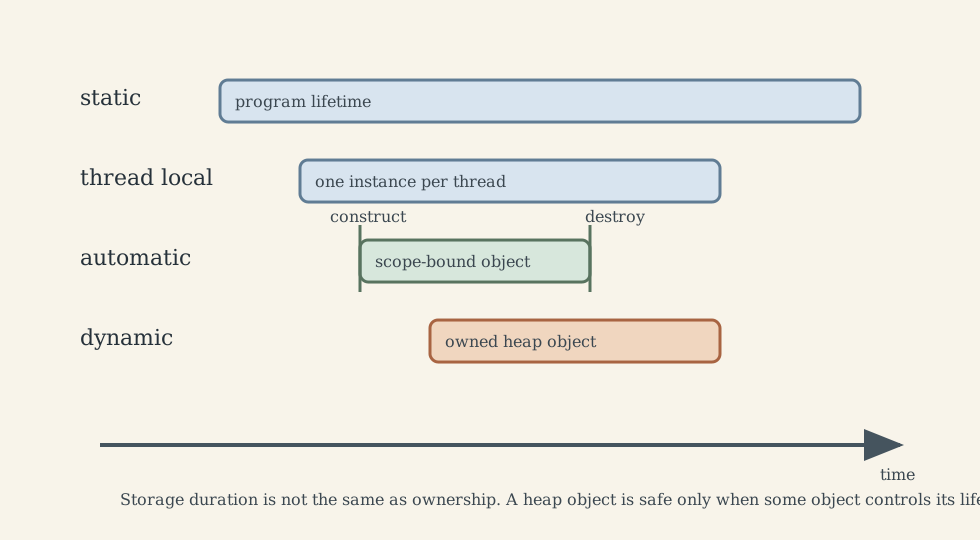
Memory correctness in C++ depends on distinguishing where storage comes from and when object lifetime begins and ends.
3.1 Automatic Storage: Usually the Default
Local variables normally have automatic storage duration. They are constructed when execution enters their scope and destroyed when execution leaves it.
void process_once() {
    std::array<double, 3> accel{0.0, 0.0, 9.81};
} // accel is destroyed here
Automatic objects are fast and simple because lifetime follows lexical scope. The limitation is size and lifetime: a huge array can overflow the stack, and an object cannot safely outlive the scope that created it unless ownership is transferred elsewhere.
3.2 Dynamic Storage: Useful but Dangerous Without Ownership
Dynamic storage, often called heap storage, is used when size or lifetime is not known statically:
auto samples = std::make_unique<std::vector<double>>();
samples->push_back(1.0);
The old style is:
auto* p = new int(42);
delete p;
This is legal C++, but it is usually the wrong interface for application code. A raw owning pointer can leak, be deleted twice, or be used after deletion. In modern C++, raw pointers are better treated as non-owning views unless the surrounding API very clearly says otherwise.
3.3 Static and Thread-Local Storage
Objects with static storage duration live for the whole program. They are useful for constants and carefully controlled global state, but global mutable state makes testing and concurrency harder.
constexpr double gravity = 9.80665;
thread_local creates one instance per thread:
thread_local std::vector<double> scratch_buffer;
This can reduce locking, but it also increases memory use and can make behavior depend on thread structure.
4. Pointers, References, and Ownership
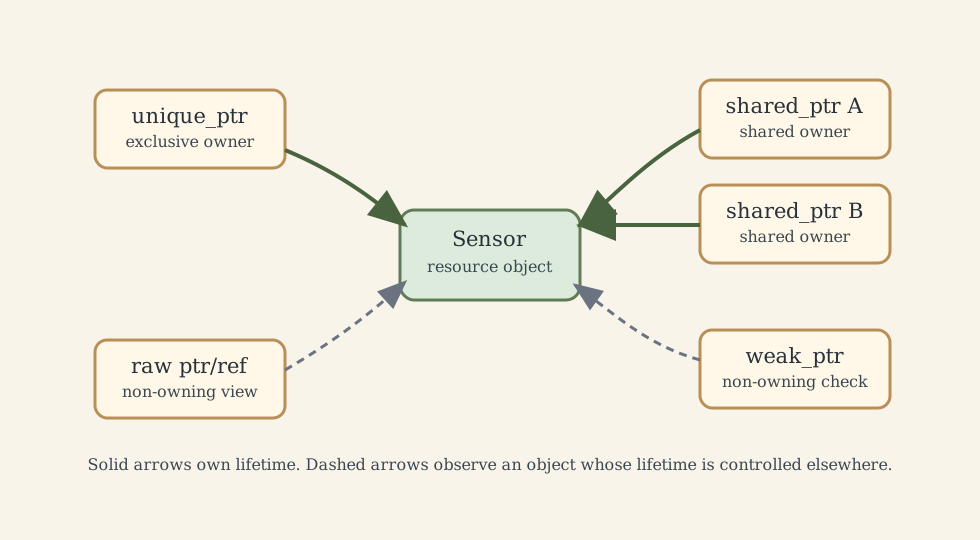
A pointer stores an address. A reference is an alias to an existing object. A smart pointer expresses ownership.
int x = 42;
int* p = &x;     // p points to x
int& r = x;      // r is another name for x
*p = 7;          // modifies x
r = 9;           // also modifies x
Use a reference when the target must exist and cannot be reseated. Use a pointer when nullptr is meaningful, pointer arithmetic is needed, or reseating is needed. Use a smart pointer when ownership must be represented.
4.1 Smart Pointers
std::unique_ptr<T> represents exclusive ownership:
#include <memory>

struct Sensor {
    double read() const { return 0.0; }
};

std::unique_ptr<Sensor> make_sensor() {
    return std::make_unique<Sensor>();
}
It cannot be copied because there must be one owner, but it can be moved.
std::shared_ptr<T> represents shared ownership through reference counting. It is appropriate when no single owner can be named cleanly. It is not a default replacement for unique_ptr: it has overhead and can create cycles.
std::weak_ptr<T> observes an object managed by shared_ptr without extending its lifetime. It is commonly used to break cycles in graphs or parent-child structures.
4.2 Move Semantics
Moving transfers resources instead of copying them:
std::vector<double> a(1'000'000);
std::vector<double> b = std::move(a);  // usually moves buffer ownership
After a move, the moved-from object remains valid but its value is unspecified except for operations promised by its type. Do not assume a is empty unless the type documents that behavior.
5. RAII: Resource Lifetime as a Design Tool
RAII means Resource Acquisition Is Initialization. A resource is acquired by an object’s constructor and released by its destructor. This makes cleanup deterministic, including during exceptions.
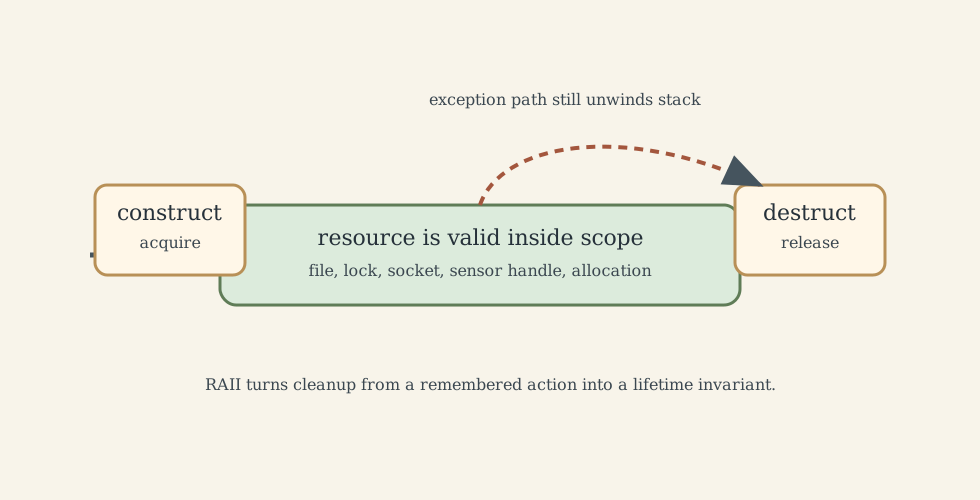
The sensor example can be written as an owning class:
#include <stdexcept>
#include <string>
#include <utility>

class SensorSession {
public:
    explicit SensorSession(std::string port)
        : port_(std::move(port)) {
        // open device or simulation handle here
        open_ = true;
    }

    ~SensorSession() {
        if (open_) {
            // close handle here
        }
    }

    SensorSession(const SensorSession&) = delete;
    SensorSession& operator=(const SensorSession&) = delete;

    SensorSession(SensorSession&& other) noexcept
        : port_(std::move(other.port_)), open_(std::exchange(other.open_, false)) {}

    SensorSession& operator=(SensorSession&& other) noexcept {
        if (this != &other) {
            if (open_) {
                // close current handle here
            }
            port_ = std::move(other.port_);
            open_ = std::exchange(other.open_, false);
        }
        return *this;
    }

    double read() const {
        if (!open_) throw std::runtime_error("sensor is closed");
        return 0.0;
    }

private:
    std::string port_;
    bool open_{false};
};
This class is non-copyable because duplicating a hardware handle may be invalid. It is movable because ownership can transfer from one session object to another.
The Rule of Zero is even better: compose classes from members such as std::vector, std::string, std::unique_ptr, std::fstream, and lock guards so the compiler-generated destructor, copy, and move operations are correct. Write custom special member functions only when the class directly owns a non-RAII resource.
6. Abstraction: Classes, Templates, and Runtime Polymorphism
6.1 Classes Own Invariants
A class is useful when it protects an invariant:
class SampleBuffer {
public:
    explicit SampleBuffer(std::size_t capacity) : capacity_(capacity) {
        samples_.reserve(capacity);
    }

    void push(double x) {
        if (samples_.size() == capacity_) {
            samples_.erase(samples_.begin());
        }
        samples_.push_back(x);
    }

    const std::vector<double>& data() const { return samples_; }

private:
    std::size_t capacity_;
    std::vector<double> samples_;
};
The invariant is that the buffer never stores more than capacity_ samples. private is not secrecy for its own sake; it keeps invalid states unreachable.
6.2 Templates Move Decisions to Compile Time
Templates generate code for specific types at compile time:
template<class T>
T clamp_value(T x, T lo, T hi) {
    return (x < lo) ? lo : (hi < x ? hi : x);
}
This is zero-overhead in the sense that no runtime type dispatch is required. The tradeoff is compile time, error-message complexity, and possible binary growth when many specializations are generated.
6.3 Virtual Dispatch Moves Decisions to Runtime
Runtime polymorphism is useful when the concrete type is not known until execution:
class SensorModel {
public:
    virtual ~SensorModel() = default;
    virtual double read() = 0;
};

class SimulatedSensor : public SensorModel {
public:
    double read() override { return 0.0; }
};
A virtual call usually requires an indirection through a virtual table. That cost is normally small, but it can matter in tight loops or memory-sensitive code. The design question is practical: do we need runtime substitution, or can templates/static polymorphism solve the problem earlier?
Watch for object slicing:
void bad(SensorModel model);        // impossible here because abstract,
                                    // but slicing occurs with concrete bases
void good(SensorModel& model);      // preserves dynamic type
Polymorphic base classes should have virtual destructors if objects may be deleted through base pointers.
7. Standard Containers, Iterators, and Memory Locality
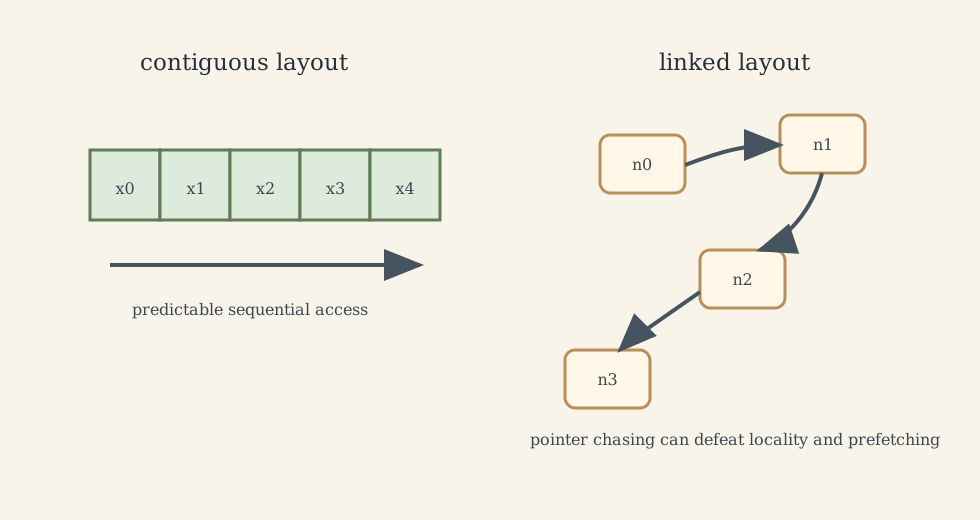
The default container is often std::vector because it stores elements contiguously. Contiguity helps caches and makes iteration fast.
| Container | Strength | Cost |
|---|---|---|
std::vector |
contiguous storage, fast iteration, amortized constant-time append | insertion/erase in the middle moves elements |
std::deque |
efficient front and back insertion | not fully contiguous |
std::list |
stable iterators and cheap splice when node is already known | poor locality and linear search |
std::map / std::set |
ordered keys, logarithmic lookup | node allocation and pointer chasing |
std::unordered_map / std::unordered_set |
average constant-time lookup | hashing cost, rehashing, no order |
Prefer algorithms over handwritten loops when they express the intent:
#include <algorithm>
#include <numeric>
#include <vector>

std::vector<double> xs{3.0, 1.0, 4.0};
std::sort(xs.begin(), xs.end());
double sum = std::accumulate(xs.begin(), xs.end(), 0.0);
Iterators are generalized positions in a range. They are not always raw pointers, but vector iterators behave pointer-like enough that algorithms can compile to efficient loops.
8. I/O, Error Handling, and Exception Safety
Streams are RAII objects:
#include <fstream>
#include <stdexcept>
#include <string>

void write_sample(const std::string& path, double x) {
    std::ofstream out(path);
    if (!out) {
        throw std::runtime_error("could not open output file");
    }
    out << x << '\n';
} // file closes here
Exception handling works because stack unwinding destroys local objects:
try {
    write_sample("sample.txt", 3.14);
} catch (const std::exception& e) {
    // report or recover
}
Throw by value and catch by const reference. Mark functions noexcept only when they really cannot throw or when termination is acceptable if they do. Move constructors are often marked noexcept because containers can then move elements safely during reallocation.
For high-volume I/O:
- prefer
'\n'overstd::endlunless you need a flush; - use binary I/O when formatted text is the bottleneck and portability is controlled;
- separate I/O-bound waiting from CPU-bound processing when designing pipelines;
- measure before replacing clear code with platform-specific tricks such as memory mapping.
9. Concurrency: Shared State Is the Expensive Part
Threads are useful when work can proceed independently. They become dangerous when they share mutable state without synchronization.
#include <thread>

void worker(int id) {
    // do independent work
}

int main() {
    std::thread t1(worker, 1);
    std::thread t2(worker, 2);
    t1.join();
    t2.join();
}
Prefer join() unless there is a carefully designed ownership model for detached work. In C++20, std::jthread improves lifecycle management by joining automatically and supporting cooperative cancellation.
9.1 Mutexes and Lock RAII
#include <mutex>
#include <vector>

std::mutex m;
std::vector<double> shared_samples;

void push_sample(double x) {
    std::lock_guard<std::mutex> lock(m);
    shared_samples.push_back(x);
}
Manual lock() and unlock() are fragile because an exception or early return can leave the mutex locked. std::lock_guard, std::unique_lock, and std::scoped_lock express lock lifetime as object lifetime.
Deadlock occurs when threads wait on locks in a cycle. The usual defenses are:
- avoid shared mutable state when possible;
- use a consistent lock order;
- keep critical sections short;
- use
std::scoped_lockfor multiple mutexes; - avoid calling unknown user code while holding a lock.
9.2 Condition Variables, Semaphores, and Atomics
A condition variable lets a thread sleep until a predicate becomes true:
#include <condition_variable>
#include <mutex>
#include <queue>

std::mutex mtx;
std::condition_variable cv;
std::queue<double> q;
bool done = false;

void consumer() {
    while (true) {
        std::unique_lock<std::mutex> lock(mtx);
        cv.wait(lock, [] { return done || !q.empty(); });
        if (done && q.empty()) break;
        double x = q.front();
        q.pop();
        lock.unlock();
        // process x outside the lock
    }
}
Always wait with a predicate because wakeups can be spurious and because another thread may consume the condition first.
C++20 adds standard semaphores in <semaphore>. A counting semaphore limits concurrent access to a resource pool:
#include <semaphore>

std::counting_semaphore<3> slots(3);
std::atomic is appropriate for simple shared counters and flags:
#include <atomic>

std::atomic<int> count{0};
count.fetch_add(1, std::memory_order_relaxed);
Use default sequential consistency unless a weaker memory order is justified by measurement and careful reasoning. Relaxed atomics are not a magic performance switch; they solve only specific ordering problems.
10. Performance: Measure the Bottleneck You Actually Have
C++ makes performance possible, not automatic. The first question is which resource is limiting:
- CPU arithmetic or branch prediction;
- memory bandwidth or cache misses;
- heap allocation and fragmentation;
- disk, network, or device I/O;
- lock contention or false sharing;
- compile time and binary size.
Cache-aware layout often matters more than asymptotic complexity for moderate data sizes. A linear scan through a std::vector can beat tree lookup because the vector uses contiguous memory and predictable access.
Struct layout also matters:
struct Bad {
    char a;
    int b;
    char c;
};

struct Better {
    int b;
    char a;
    char c;
};
The exact sizes are implementation-dependent, but Bad often contains more padding because int needs alignment. Reordering fields can reduce memory footprint in large arrays. Use sizeof, profiling, compiler reports, and hardware performance counters rather than guessing.
For thread-level performance, beware false sharing: two threads write different variables that sit on the same cache line, causing the cache line to bounce between cores. Padding or data partitioning can help, but only after measurement shows it is real.
11. Modern C++ Working Rules
- Prefer values and automatic storage when lifetime is simple.
- Use
std::unique_ptrfor exclusive heap ownership; usestd::shared_ptronly when ownership is genuinely shared. - Treat raw pointers and references as non-owning unless an API explicitly says otherwise.
- Use RAII for memory, files, locks, sockets, device handles, and transactions.
- Prefer the Rule of Zero; write special member functions only for direct resource ownership.
- Use
constto state non-mutation and improve local reasoning. - Prefer
std::vectoruntil access patterns justify another container. - Prefer standard algorithms when they make intent clearer.
- Minimize shared mutable state in concurrent code.
- Profile before optimizing; performance intuition is often wrong.
What This Framework Lets Us Do
This framework turns C++ from a list of language features into a resource model. It lets us ask:
- what object owns this resource?
- when does construction begin and destruction happen?
- is this pointer observing or owning?
- is this abstraction compile-time, runtime, or erased behind a wrapper?
- does the bottleneck come from CPU, memory, I/O, or synchronization?
That is the engineering value of C++: the program can express high-level intent while still controlling the machinery beneath it.
Where the Framework Stops Being Reliable
Rules of thumb fail at boundaries. Embedded code may require memory-mapped registers and restricted allocation. High-performance systems may use custom allocators. Legacy APIs may expose raw pointers. Some projects disable exceptions. Some real-time systems avoid unbounded heap allocation. The right C++ style depends on the project constraints, compiler, standard version, platform ABI, and measurement.
Where the Subject Leads Next
The next steps are:
- data structures and algorithms for asymptotic reasoning;
- operating systems for processes, virtual memory, and system calls;
- computer architecture for cache, branch prediction, SIMD, and memory consistency;
- parallel programming for OpenMP, MPI, CUDA, and task runtimes;
- embedded systems for hardware registers, interrupts, and deterministic timing.
Technical and Editorial Audit
| Area | Correction or decision |
|---|---|
| Central question | Reframed the note around high-level abstraction with explicit lifetime and resource control. |
| Preserved material | Kept representative examples for pointers, smart pointers, classes, templates, containers, I/O, mutexes, condition variables, semaphores, and atomics. |
| Ownership | Softened absolute rules around raw new and delete; application code should avoid them, but low-level libraries and legacy interfaces may expose them. |
| Version caveats | Marked semaphores and std::jthread as C++20 features; avoided claiming universal compiler/library availability. |
| Performance claims | Replaced fixed speedup numbers with mechanism-based explanations and measurement guidance. |
| Concurrency | Clarified that volatile is not synchronization and that relaxed atomics require a specific memory-ordering argument. |
| Figures | Added five original SVG diagrams for compilation, storage/lifetime, ownership, RAII, and memory locality. |
| Sources requiring verification | For production guidance, check the active project standard level, compiler, standard library, ABI constraints, and coding guidelines. |
Sources and Further Reading
- ISO C++ Foundation guidelines and FAQ: https://isocpp.org/faq
- C++ Core Guidelines: https://isocpp.github.io/CppCoreGuidelines/CppCoreGuidelines
- C++ working draft index: https://eel.is/c++draft/
- cppreference language and library reference: https://en.cppreference.com/w/